AI Provider
Everything related to the AI connection that powers the assistant.
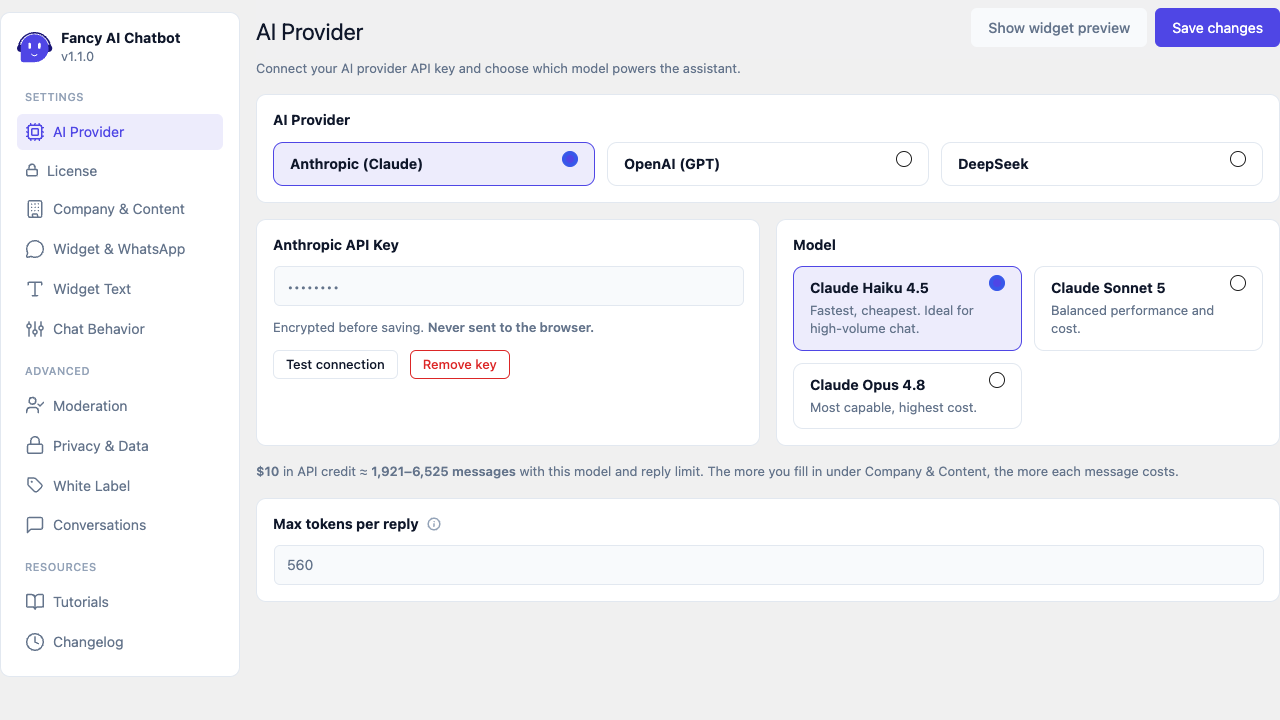
AI Provider
A switcher at the top lets you choose which AI provider powers the assistant: Anthropic (Claude), OpenAI (GPT), or DeepSeek. Anthropic is selected by default on a fresh install.
Switching providers only changes which one is active — every provider's API key and model stay saved independently, so switching back and forth never loses what you already configured for any of them.
API key
- Stored encrypted at rest and never sent to the visitor's browser — every call to your AI provider goes through the WordPress server itself.
- While a key is saved, the field shows it masked (
********) — to replace it, just paste a new one and save; to confirm it without changing it, use Test connection (no need to paste it again).
Test connection
Button next to the key field. Makes a minimal real call (max_tokens 16) to whichever provider is selected, with the selected model, and
distinguishes three outcomes:
- Invalid key — the provider rejected it (typo, or a revoked key).
- Out of credits — the key is valid but the account has no balance.
- Couldn't connect — a network/server problem (the server doesn't allow outbound HTTPS requests, for example).
Works both with a key freshly pasted into the field (before saving) and with the key already saved (leaving the field masked as-is).
Remove key
Button to delete the saved key for that provider (asks for confirmation, since the assistant is disconnected until a new one is saved, if that's the currently active provider). Only shows up if a key is currently saved for that provider.
Model
Each provider has its own selector:
Anthropic (Claude):
| Model | When to use it |
|---|---|
| Claude Haiku 4.5 | Fastest and cheapest — ideal for high chat volume |
| Claude Sonnet 5 | Balance between capability and cost |
| Claude Opus 4.8 | Most capable, highest cost |
OpenAI (GPT):
| Model | When to use it |
|---|---|
| GPT-5.6 Luna | Fastest and cheapest — ideal for high chat volume |
| GPT-5.6 Terra | Balance between capability and cost |
| GPT-5.6 Sol | Most capable, highest cost |
DeepSeek:
| Model | When to use it |
|---|---|
| DeepSeek V4 Flash | Fastest and cheapest — ideal for high chat volume |
| DeepSeek V4 Pro | Most capable, highest cost |
The fastest/cheapest model of whichever provider is active (Claude Haiku 4.5, GPT-5.6 Luna, or DeepSeek V4 Flash) is pre-selected by default.
Max tokens per reply
Token ceiling for each assistant reply (range 256–8000), shared across every provider. Higher values allow longer replies, but cost more per message.
Live cost estimator
Below the model selector and the token limit: "$10 in API credit ≈ X–Y messages with this model and limit." Recalculated instantly as you switch provider, change model, or adjust the token limit — before saving — so you decide with the cost in front of you, not after it's already configured.
The range (X–Y) goes from a worst case to a typical case, which is why it's a range and not a single number:
- The low end assumes every reply runs all the way to your token limit, on a quiet site where messages arrive too far apart for the provider's prompt cache to help. This is the pessimistic floor.
- The high end assumes short replies inside an ongoing conversation, where the provider is reusing its cached copy of your business information instead of charging full price for it again.
It depends on how much you fill in
The estimate is calculated from the business information you have actually entered under Company & Content — your profile, services, pricing, FAQs, contacts and any scanned page content. All of it is sent to the AI with every single message, so it is usually the largest part of what you pay for, far bigger than what the visitor types.
This means the figure drops as you add more content, which is expected and not a bug. If a number looks lower than you want, the lever is trimming what's under Company & Content down to what the assistant genuinely needs to answer well.
Only the first message of each conversation pays full price for that information; providers cache it, so the rest of the conversation is substantially cheaper. That is already accounted for above.
Treat it as a planning aid, not a bill. Your real spend is always measured from what the provider itself reports, which is also what the daily spend limit enforces.